
BUI is supporting Data Privacy Week as a Champion organisation, promoting transparency, trust, and practical steps to help you take control of your personal data.
BUI is proud to announce its commitment to Data Privacy Week 2026, taking place from 26-30 January, by registering as an official Data Privacy Week Champion.
As a Champion organisation, BUI recognises and supports the principle that all organisations share the responsibility of being conscientious stewards of personal information. In an era where data is generated constantly (often without people even realising it), respecting privacy is a fundamental component of trust.
Data Privacy Week is a global awareness initiative led in North America by the National Cybersecurity Alliance. Originally launched as Data Privacy Day, the campaign has expanded into a full week to reflect the growing importance of privacy in our always-connected, data-driven world.
The goal of Data Privacy Week is twofold: to help individuals understand that they have power and choice over their personal data, and to help organisations understand why respecting data privacy is essential to maintaining transparency and accountability.
Today, data privacy is about much more than screen-locking and device security. It includes how information about us – our identities, locations, behaviours, and preferences – is collected, managed, and protected online. At its core, data privacy is about our right to decide how much of our personal information is visible, accessible, or shared – and with whom.
When we browse a website, stream a video, or use a mobile app, we’re generating vast amounts of information about ourselves and our habits. This data is valuable and often monetised by service providers, advertisers, and data brokers – even when it’s claimed to be anonymised.
This year, Data Privacy Week highlights the growing expectation that organisations treat privacy as a core value rather than a compliance exercise, notes BUI Group Governance and Compliance Manager Dhiren Boodhia. “Every organisation that handles personal information has a duty to be deliberate about how that data is collected, used, and secured. Data Privacy Week is an opportunity to pause, reflect, and make sure those decisions are being made with people top of mind,” he says.
While it’s difficult to control how each byte of data about you is processed, you are not powerless. Data Privacy Week is all about taking practical steps to manage your personal information.
When you download a new app, create an online account, or sign up for a digital service, you’re often asked to share personal information before you can even get started. This might include access to your location, contacts, photos, or data about how you use your device.
For the organisations offering “free” services, personal data is often a key part of the value exchange. That doesn’t mean you should automatically say no – but it does mean it’s worth pausing to assess whether the service you’re getting is a fair return for the data being requested. One way to approach these decisions is to think about necessity. Ask yourself:
Once you understand this trade-off between privacy and convenience, it becomes easier to make smarter choices about your data – and often, you can still use digital apps and services while sharing far less information than you initially thought necessary.
Most apps and digital services include privacy and security settings that let you manage how your personal information is used. These settings usually only take a few minutes to review, but they’re often overlooked.
Even if an app or service doesn’t actively ask for certain data, it’s safest to assume it may still be collecting information in the background. That’s why it’s a good idea to review your privacy settings regularly to make sure they still reflect your level of comfort.
As a starting point, consider turning the following permissions off unless they’re essential and you trust the app or service:
You don’t need to review everything at once. Start with one device or a handful of apps, and build the habit over time. Regular check-ins can make a meaningful difference to how much data you share.
Strong security habits help ensure that your personal information doesn’t fall into the wrong hands, whether through account compromise, malware, or social engineering. Along with managing your data privacy settings, remember these tips to safeguard your information:
Together, these habits can help protect not just your data, but your digital identity as a whole.
Throughout Data Privacy Week, we’ll be sharing tips and resources to help you become more aware of data privacy at work, at home, and on the move. Follow us on Facebook and LinkedIn and join the conversation by using the #DataPrivacyWeek hashtag online.
Data Privacy Week began as Data Privacy Day in the United States and Canada in January 2008 as an extension of the Data Protection Day celebration in Europe. Data Protection Day commemorates the 28 January 1981 signing of Convention 108, the first legally binding international treaty dealing with privacy and data protection. The National Cybersecurity Alliance, the United States’ leading non-profit, public-private partnership promoting cybersecurity and privacy education and awareness, leads the effort in North America each year. For more information, visit www.staysafeonline.org/data-privacy-week/.
The National Cybersecurity Alliance (NCA) is a non-profit organisation on a mission to create a more secure, interconnected world. The NCA advocates for the safe use of all technology and educates everyone on how best to protect themselves, their families, and their organisations from cybercrime. The NCA creates strong partnerships between governments and corporations to amplify its message and to foster a greater digital good. For more information, visit www.staysafeonline.org.
Here’s how BUI can help you take advantage of the new AI-powered capabilities in Microsoft Defender, Microsoft Sentinel and Microsoft 365 E5 to strengthen your security operations.
The security landscape is shifting again: Microsoft has just unveiled a new wave of integrated AI capabilities across Microsoft Defender, Microsoft Sentinel and Microsoft 365 E5. These advancements, showcased during the 2025 Microsoft Ignite conference in San Francisco, are designed to transform how organisations detect, investigate and respond to threats. For those already managing complex hybrid and multi-cloud environments, this new era of AI-powered security offers substantial benefits – but it also requires a strategic approach to deployment and implementation to ensure success.
As a Microsoft Solutions Partner for Security, a Microsoft MXDR Verified Partner, and a member of the Microsoft Intelligent Security Association, we’re uniquely positioned to help you turn these innovations into measurable results. Let’s take a closer look at the major security announcements from Ignite, what they mean for organisations like yours, and how the BUI team can support you.
Microsoft has introduced new agents, powered by Security Copilot, to bring AI into the day-to-day workflows for SIEM and XDR users within Microsoft Defender. These agents can assist with threat hunting, intelligence analysis, incident investigation, and risk prioritisation, helping analysts work faster and more accurately. Microsoft is also improving the Microsoft Defender incident queue, with an updated AI-powered experience now in public preview.
Quick overview: The Threat Hunting Agent guides analysts through end-to-end investigations using natural language. It delivers direct answers, suggests investigative steps, and provides context that speeds up the discovery of anomalies.
Key benefits: With this agent in play, threat hunting becomes faster and more consistent. Your junior analysts will be empowered to perform advanced tasks and your senior analysts will gain precious time for deeper analysis. Overall, your SecOps team will benefit from increased investigative capacity.
Quick overview: Integrated into the Microsoft Defender portal, the Threat Intelligence Briefing Agent creates custom intelligence briefings by combining Microsoft Threat Intelligence with global feeds and organisation-specific context. Analysts can use these briefings to better understand risks, vulnerabilities, and emerging campaigns.
Key benefits: Your SecOps team will gain quick access to relevant threat intelligence without having to conduct manual research. They can prioritise risks more effectively and initiate remediation based on clear recommendations and direct links to affected assets.
Quick overview: The Dynamic Threat Detection Agent proactively hunts for false negatives and blind spots. When a major incident occurs, it checks for related undetected threats (such as latent activity on sensitive identities), thereby identifying gaps that traditional alerting might miss.
Key benefits: Your SecOps team will have a safety net that increases confidence during high-impact investigations. You’ll be able to validate that incidents have been fully contained and that hidden activity does not go unnoticed.
Quick overview: A new Microsoft Defender incident queue experience (currently in public preview) uses artificial intelligence to score and prioritise security incidents. By leveraging factors like alert types, criticality tags and MITRE mappings, it produces risk scores that help analysts understand which incidents require immediate action.
Key benefits: Your SecOps team will have a clear view of incident rankings, enabling faster and more confident decision-making in the face of high-impact threats.
Microsoft has also introduced a significant set of updates to Microsoft Sentinel, its connector ecosystem, and the Sentinel data lake. Together, these improvements support businesses that want to unify signals, reduce storage costs, and maintain strict governance across complex cloud environments.
Quick overview: Microsoft unveiled a broad set of new out-of-the-box connectors that support AWS, GCP, SAP, Palo Alto and numerous third-party security and compliance platforms. These connectors make it easier to bring multi-cloud and hybrid telemetry into Sentinel without custom development.
Why this matters: Richer telemetry increases the accuracy of detection and reduces blind spots across your distributed environments. These connectors also expand Microsoft Purview Data Security Posture Management capabilities through streamlined access to external data asset information.
Quick overview: Sentinel now supports the direct ingestion of Microsoft Defender for Endpoint data into the data lake, with Defender for Office 365 and Defender for Cloud Apps expansion coming in December 2025. Entra, Syslog, CEF and CommonSecurityLog sources can also be ingested.
Why this matters: This model gives you cost-effective long-term storage for historical security data. It also provides the depth needed for retro-hunting, incident review, and compliance without storing everything in the analytics tier.
Quick overview: The Sentinel data lake has enhanced its permission model to enable users to access workspace data in the lake based on their granular Azure role-based access control (RBAC) permissions on each workspace. Support for managed identities and service principals is coming soon.
Why this matters: You can now implement more precise access controls, supporting least-privilege models across your SIEM and data lake environments. Your automation workflows can also operate more securely through identity-based access.
Quick overview: Microsoft’s threat intelligence library covering threat actors, vulnerabilities, campaigns, and indicators of compromise is now available to Sentinel users. The intelligence aligns to MITRE techniques, tactics and procedures.
Why this matters: High-quality threat intelligence gives analysts detailed insights for proactive hunting and remediation. Your SecOps team can respond more effectively when attacker behaviours and relevant indicators are clear.

Ryan Roslansky (CEO, LinkedIn and Executive Vice President, Microsoft Office and Copilot) speaks during the 2025 Microsoft Ignite conference in San Francisco. Photo credit: Microsoft
One of the most impactful Ignite announcements this week was the inclusion of Security Copilot for Microsoft 365 E5 customers. This change brings AI agents directly into Defender, Entra, Purview and Intune for Microsoft 365 E5 customers.
Quick overview: Security Copilot capabilities are being activated for Microsoft 365 E5 customers in phases. Organisations with existing Security Copilot licences and Microsoft 365 E5 have access now. All other Microsoft 365 E5 customers will receive access soon, with a 30-day advance notification from Microsoft.
Why this matters: For many organisations, this significantly increases the value of their Microsoft 365 E5 investments, especially at a time when staff shortages and high alert volumes are putting pressure on internal teams. Now, SecOps analysts will gain immediate access to AI tools across the Microsoft 365 security ecosystem for richer context and consistent, intelligent assistance.
The latest AI capabilities in Microsoft Defender and Microsoft Sentinel allow security professionals to work faster and more accurately, but only when they’re properly embedded into existing processes. We can help you:
Whether you’re onboarding new data sources, expanding your threat intelligence workflows, or modernising your architecture, we can provide the technical and operational support to transform your Security Operations Centre into a proactive, intelligence-driven defence hub.
With Security Copilot now included for Microsoft 365 E5 customers – and Security Compute Units (SCUs) required to scale AI workloads – you may need clarity on configuration, optimisation, and cost control. We provide guided deployment and optimisation services to help you verify that Security Copilot is configured correctly; prompts and workflows are efficient; and SCU usage remains predictable. We can also help you model and forecast usage patterns so that you gain maximum value without unnecessary spend.
As AI becomes more important to your security operations, you’re responsible for ensuring that automation remains transparent, validated, and aligned with applicable compliance policies. We can help you establish practical oversight frameworks that support the confident use of AI. Our advisory services include governance model design, automated action review, validation of AI-assisted outcomes, and guardrails that reduce risk while maintaining agility. This approach enables your team to innovate securely while retaining full control and accountability.
Microsoft Ignite 2025 has made one thing undeniable: AI is now at the core of Microsoft’s security stack, empowering organisations with smarter detection, richer context, and automated decision-making across Microsoft Defender, Microsoft Sentinel, and Microsoft 365 E5.
Here at BUI, we know that adopting new technologies is only the beginning… The real business transformation happens when AI is operationalised: integrated into playbooks, governed responsibly, and fully embraced by the people who depend on it.
We’re here to help. If you’re ready to strengthen your security posture, modernise your security operations, and empower your teams with Microsoft’s latest capabilities, let’s get started. Contact us to arrange a chat.
Zandre Janse van Vuuren explains why cybercrime spikes during the holiday season and shares practical tips to help you protect your organisation from opportunistic attackers.
By Zandre Janse van Vuuren | Service Delivery Manager: Cyber DFIR, BUI
The months of November and December are a perfect storm for cybercriminals. Retailers, logistics companies, and organisations closing out their financial year are at peak operational intensity, processing high volumes of sales, payments, and customer data.
But just as business activity surges, security staffing drops. Key personnel take annual leave, incident response teams shrink, and IT capacity thins out. This imbalance creates what’s known as the “holiday blackout”, a seasonal window when attackers know defences are down and reaction times are slow.
During this period, cybercriminals ramp up their ransomware, phishing and extortion campaigns to strike when you’re least prepared. And their goal isn’t just to breach your defences: it’s to disrupt your operations when downtime is most damaging.
The solution? In a word: readiness. By focusing on cyber resilience (your ability to protect your critical assets, respond to inevitable attacks, and recover quickly), you can keep your business running and reduce the risk of financial and reputational damage when attackers do strike.
The holiday season brings an uptick in cybercrimes and digital scams that exploit distraction, emotion, and urgency. Understanding this threat landscape is essential for developing a proactive security strategy for your organisation.
Phishing is consistently identified as the number one social engineering strategy. During the holiday season, cybercriminals know that people are juggling personal shopping, shipping alerts and end-of-year workplace tasks, which lowers vigilance and increases click rates. Common phishing campaigns include:
When inboxes and screens are flooded with legitimate notifications, a fake one can slip through easily – especially when employees are too stressed or too distracted to stop and interrogate a suspicious message.
Behind many of these phishing campaigns are access brokers who specialise in gaining unauthorised initial access to organisational networks and then selling that access to ransomware groups. There’s typically a surge in access-broker activity at the end of the year when networks are busy, oversight is reduced, and employees are overwhelmed with tasks at home and at work. Successful breaches often become the entry point for larger ransomware attacks that unfold over the holidays.
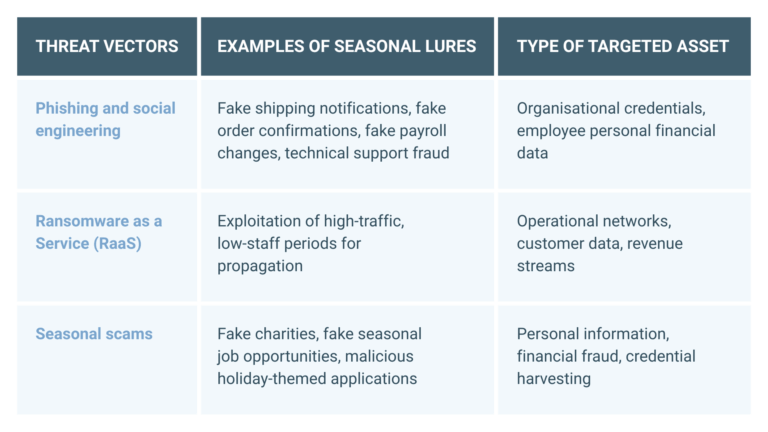
Table: Threat vectors that organisations must prepare for during the holiday season
The biggest enabler of seasonal cybercrime is reduced security staffing. Attackers time their strikes for weekends, public holidays and vacation periods, knowing that organisations are at their most vulnerable. Industry research highlights the risk clearly:
Meanwhile, modern cyberattacks move quickly: it often takes less than an hour from the moment a user clicks on a malicious link until the attacker establishes a firm foothold in the system. When critical security personnel are unavailable, alerts may go unread for hours or even days, giving attackers free rein. The risk isn’t just slower detection; it’s complete operational paralysis until normal staffing resumes. That’s why seasonal security planning should prioritise rapid response capability, not just detection.
Cyber resilience requires more than robust technical defences and safeguards: it demands a strategic mindset. At the very least, you should:
Don’t ever think you’re too small to be targeted. It’s a myth that cybercriminals ignore startups and micro- and medium-sized businesses. Smaller organisations like these are prime targets precisely because they likely have fewer defences. Remember, cybercrime has been industrialised: attackers sell stolen credentials and exploitative tools on the dark web, enabling virtually anyone to target any company’s digital assets.
Legacy or unpatched systems can be easy entry points for cybercriminals – and once they’re in, they can take advantage of existing vulnerabilities, flaws, and weaknesses in your environment. If you’ve neglected your systems and become lax about your security, then a single breach could snowball into a catastrophic business failure. Make sure you concentrate on patching and protecting your systems before key security staff go on vacation.
Robust identity and access management controls and device encryption are essential throughout the year – but even more so during the holiday season when security teams are smaller and more pressured. Make sure you enforce strong password policies and encrypt all sensitive data (at rest and in transit) to help prevent data leaks in the event that business devices are mishandled, lost, or stolen.
A written incident response plan isn’t good enough; it needs to be tried and tested. Many organisations still haven’t rehearsed what to do if a ransomware attack occurs over a weekend or holiday period. Make sure you’ve run tabletop exercises, tested communications and capabilities under low-staff conditions, and confirmed that everyone knows their role.
Human error remains the top cause of breaches. Take the time to give your employees a refresher course in password hygiene, general security awareness and vigilance, and the correct technical route for raising and reporting issues. Regular mini training sessions that address the current threat landscape (for example, a 10-minute overview of seasonal phishing tactics) can be more effective than lengthy presentations.
Cyber resilience means having a framework that protects your key assets, enables an effective response, supports quick recovery, and maintains customer trust even after a successful cyberattack. Building this framework involves assessing risks, keeping hardware and software updated, reviewing access policies, and enforcing security standards across your connected environment.
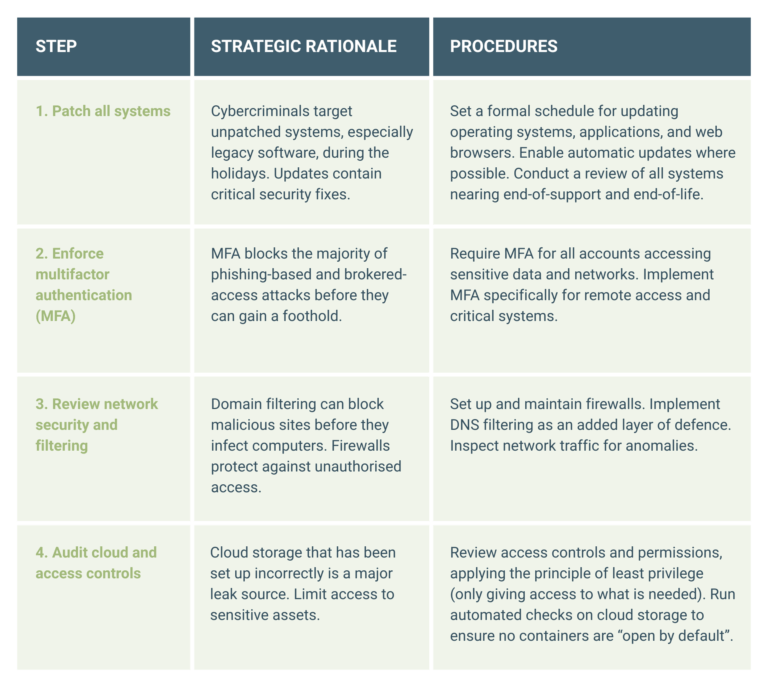
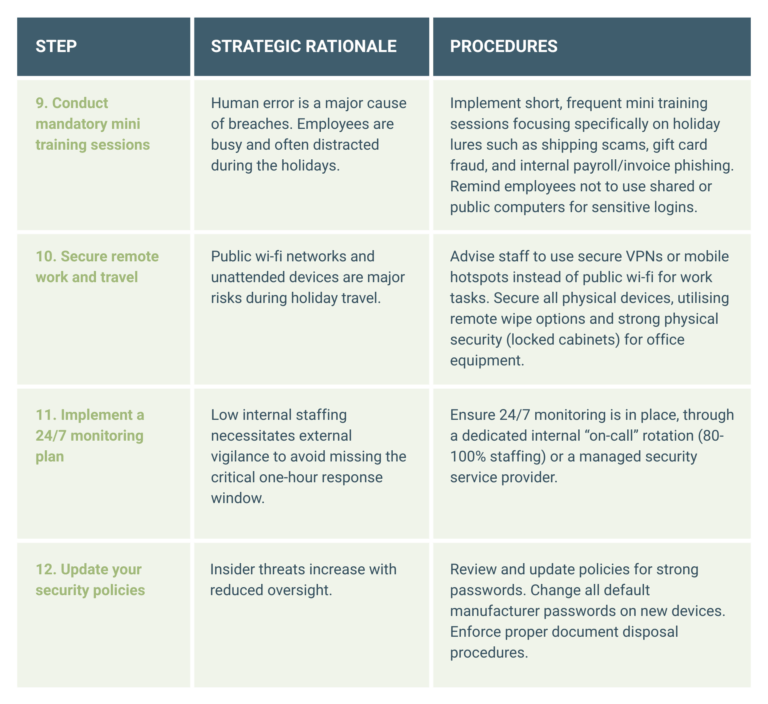
A phased, actionable checklist is necessary to translate strategic goals into measurable operational tasks. This checklist outlines the actions with the highest impact, organised by deployment priority, leading up to the end-of-year shutdown.
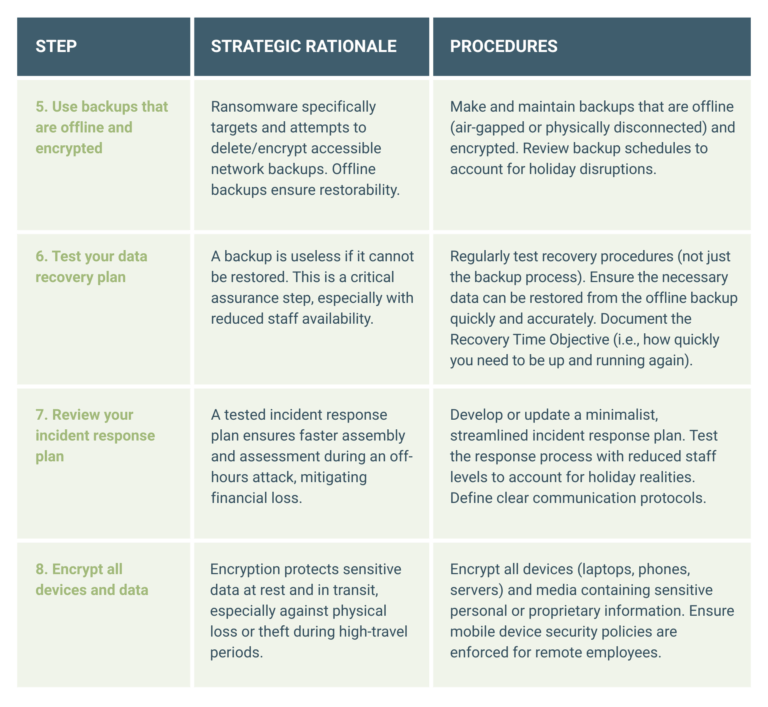
Data-recovery capabilities are paramount over the holiday season because a cyberattack during low staffing risks permanent data loss. Your focus must be on assuring restorability rather than merely assuming backups exist.
The final week should be focused on staff education so that your people are aware of the heightened risk landscape and the prevalence of seasonal scams.
The weeks leading up to the holidays present one of the most dangerous periods of the year for cyberattacks. Well-organised threat groups know that yearend pressures, reduced staffing, and increased digital activity create ideal conditions to strike.
Preventing every attack isn’t realistic, but ensuring your business can withstand, respond to, and recover from one absolutely is. True cyber resilience means being ready for disruption, but this resilience isn’t built overnight: it’s achieved through deliberate preparation, tested plans, and continuous learning.
As the festive season approaches, take the opportunity to validate your defences. Run your incident response plan under reduced staffing conditions. Test your offline backups. Confirm that your recovery strategy actually works when key personnel are away.
The threats of the holiday period are predictable – and that makes them preventable. By being proactive now, you can protect your systems, your data, and your business reputation to ensure a smooth start to the new year.
Cyber threats evolve constantly and your security strategy has to keep up. If you want expert guidance, improved detection capabilities, or help building operational resilience, reach out to our security team and we’ll guide you forward. Get started today.
Heinrich Wewers and Satish Sunker unpack how Microsoft Defender for Cloud can help IT leaders improve cloud security posture, detect threats, and simplify compliance.
Cloud adoption continues to accelerate faster than many organisations’ ability to secure it. As workloads span Microsoft Azure, on-premises environments, and other cloud platforms such as AWS and Google Cloud, the attack surface increases, misconfigurations multiply, and visibility often diminishes.
For CISOs and IT leaders, this creates a fundamental challenge: how do you maintain consistent security and compliance across an ever-changing cloud estate?
“Unified protection is now at the heart of modern cloud security strategies,” says Heinrich Wewers, Senior Cloud Consultant at BUI. “The focus has shifted from securing perimeters to safeguarding identities, configurations and workloads wherever they reside. It’s a reality that makes Microsoft Defender for Cloud an indispensable tool in any defender’s kit.”
Microsoft Defender for Cloud is a unified platform for monitoring and improving the security posture of all cloud resources. It combines Cloud Security Posture Management (CSPM) with Cloud Workload Protection Platform (CWPP) capabilities. CSPM continuously assesses cloud configurations, identifies risks, and delivers actionable recommendations to prevent gaps, while CWPP protects live workloads such as virtual machines, containers, databases, and storage from active threats. Together, these capabilities provide a layered defence across the entire cloud estate.
“Microsoft Defender for Cloud gives you a single-pane-of-glass view across Azure, AWS, Google Cloud, and even on-premises systems,” Wewers explains. “It doesn’t just alert you to problems; it tells you how to fix them and, in many cases, automates the process.”
Microsoft Defender for Cloud integrates natively with Azure and extends protection to other clouds via built-in connectors. This unified approach enables the management of cloud infrastructure and workload security from a single interface, giving security teams consistent visibility and control without having to juggle multiple tools or dashboards.
Traditional perimeter-based security models are no longer effective in the dynamic and distributed nature of modern cloud environments: CISOs must secure virtual machines, identities, containers, databases, and APIs that expand and contract in real time. “Legacy tools lack visibility across multiple clouds. They also lack context awareness of cloud-native constructs and the automation needed for real-time detection,” observes Wewers. “Cloud security today is dynamic, identity-centric, and API-driven.”
In this landscape, many security incidents stem not from advanced zero-day exploits but from everyday misconfigurations and human errors. Problems such as excessive permissions on identities or service principals, missing endpoint protection on cloud VMs, and unmonitored configurations created during rapid deployment can all leave critical resources exposed, says Wewers.
Cloud Security Posture Management platforms such as Microsoft Defender for Cloud address these problems by delivering continuous visibility into cloud assets and their security status; applying baselines mapped to standards such as NIST to ensure consistent compliance; and prioritising remediation efforts by identifying which misconfigurations or vulnerabilities pose the highest risk.
“Cloud security posture management isn’t a one-time exercise,” Wewers emphasises. “It’s an ongoing process. Microsoft Defender for Cloud enables teams to spot risky configurations early on and prevent gaps from accumulating in the dark.”
At the core of Microsoft Defender for Cloud’s posture management is continuous assessment, a constant evaluation of your cloud resources against Microsoft security benchmarks and global standards. Secure Score is the metric that brings this to life, explains Satish Sunker, Cloud Solutions Architect at BUI. “It continuously evaluates your Azure and multi-cloud resources against best practices and compliance standards. Each recommendation (such as enabling multi-factor authentication or restricting network access) carries a weighted impact score. As you implement the recommendations, your Secure Score improves, visually showing your progress toward a stronger security posture.”
Most organisations begin their journey with a Secure Score between 25% and 45%, depending on cloud maturity, Sunker shares. After remediating foundational issues, such as open management ports, unencrypted storage, and missing endpoint protection, many achieve 70% to 85% within months (indicating a well-hardened and monitored environment).
“Secure Score is an evidence-based, real-time metric that helps security teams prioritise actions with the biggest impact on risk reduction. Here at BUI, our customers consistently tell us that they value the contextual guidance, which turns a long list of findings into an actionable road map,” he adds. “Secure Score has also become a KPI for CISOs because it’s quantifiable, easy to track over time, and bridges the communication gap between technical teams and business stakeholders.”
When Microsoft Defender for Cloud identifies risks, it doesn’t just report them: it actually tells you how to fix them. Sunker explains that remediation is intentionally straightforward: “Each recommendation links directly to the affected resource and includes guided or automated ‘fix’ actions. You can enable Just-In-Time VM access with one click, deploy Defender for Servers agents across subscriptions automatically, or apply policies through Azure Policy for long-term prevention.”
This built-in automation lowers the barrier to action, allowing even lean security teams to make meaningful improvements quickly. And because Microsoft Defender for Cloud integrates tightly with Microsoft Sentinel and Logic Apps, many of these remediations can be orchestrated automatically, turning what used to be manual tasks into continuous protection workflows.
Microsoft Defender for Cloud actively detects and responds to cloud-native threats. It identifies malicious activity such as brute-force or anomalous login attempts, suspicious data exfiltration from storage accounts, malware and crypto-mining activity on workloads, SQL injection and privilege escalation in PaaS services, lateral movement between cloud resources, and much more.
Because it’s backed by Microsoft’s global threat intelligence and AI models, threat detection is highly contextual and continuously improving. In many real-world scenarios, BUI has seen this integration prevent incidents from escalating, says Sunker, providing an example. “Microsoft Defender for Cloud might flag anomalous network behaviour on a VM, while Microsoft Sentinel correlates that with a suspicious Entra ID login. That correlation allows our Cyber SOC analysts to stop lateral movement before compromise spreads.”
Regulatory frameworks such as ISO 27001, NIST, GDPR, and SOC 2 increasingly demand continuous, evidence-based compliance. Sunker notes that organisations are expected to prove continuous compliance, not just once-off compliance at audit time. Microsoft Defender for Cloud’s Regulatory Compliance Dashboard simplifies this task dramatically. It maps your configuration and control data against each framework’s requirements in real time, providing comprehensive visibility and insights for auditors and security teams alike.
“Compliance reporting used to involve manual audits and spreadsheets,” says Sunker. “Now, evidence is always current and exportable. You can even customise your compliance initiatives to match internal or industry-specific standards.”
Microsoft Defender for Cloud caters for the fact that most enterprises operate across multiple platforms. Using native connectors and Azure Arc, organisations can extend visibility and policy enforcement beyond Microsoft Azure to AWS, Google Cloud, and on-premises servers. This allows security teams to apply a single set of policies across all clouds, monitor non-Azure workloads in the same dashboard, and use Defender’s threat detection for AWS EC2, Google Cloud Compute Engine, and Kubernetes clusters.
“Hybrid and multi-cloud environments require consistent security controls,” notes Sunker. “Microsoft Defender for Cloud reduces fragmentation and provides a single source of truth for your posture.”
Wewers highlights that Microsoft Defender for Cloud doesn’t operate in isolation. “It’s a foundational component of the broader Microsoft security ecosystem.”
“This ecosystem integration allows for end-to-end visibility, from detection through investigation to remediation,” Wewers notes. “It turns Microsoft Defender for Cloud into a strategic control plane for security across the entire Microsoft security landscape and beyond.”
As organisations continue to evolve their digital strategies, cloud security posture management will remain a critical pillar of resilience, says Wewers. Microsoft Defender for Cloud offers not just visibility, but the intelligence and automation needed to stay ahead of threats in an ever-changing landscape. By unifying assessment, protection, and compliance under one platform, it enables security teams to move from reactive defence to proactive, strategic risk management.
“The most secure organisations are the ones that understand their security posture and continuously strive to improve it. Microsoft Defender for Cloud gives CISOs the clarity and confidence to do just that, across Azure and every connected environment,” he concludes.
To make the most of Microsoft Defender for Cloud, many organisations choose to partner with a certified Azure Expert MSP. Working alongside seasoned specialists ensures that the tool is deployed and tuned effectively, delivering measurable improvements in security posture and compliance. If you’re ready to begin, we’re here to help. Contact the BUI team today.
Satish Sunker and Heinrich Wewers explain why Azure Deployment Stacks are a smart next step toward greater governance and confidence in the cloud.
As cloud environments evolve and scale, managing infrastructure across multiple subscriptions, environments, and teams has become one of the most persistent challenges for IT professionals and managed service providers (MSPs) alike. The need for speed, consistency, and governance has never been more pressing and yet achieving all three simultaneously can often feel impossible.
Azure Deployment Stacks, one of Microsoft’s recent enhancements to the Azure Resource Manager (ARM) and Bicep ecosystem, aims to solve precisely that. By treating groups of Azure resources as cohesive, managed units, Deployment Stacks simplify lifecycle management and governance across complex environments without sacrificing flexibility or control.
To explore how Deployment Stacks can transform infrastructure management in Azure, we asked Cloud Solutions Architect Satish Sunker and Senior Cloud Consultant Heinrich Wewers to share their insights on what Deployment Stacks can do, why they matter, and how enterprises and MSPs can start benefiting from them.
Today’s cloud teams operate under immense pressure, says Satish Sunker. “Scaling infrastructure is no longer a nice-to-have… It’s actually an expectation from the business,” he explains. “Teams are required to provision and expand environments quickly, without compromising reliability or performance.”
With this pressure comes complexity. Maintaining consistency across environments, subscriptions, and regions can become a full-time job in itself. Each team may interpret organisational standards slightly differently or make ad hoc changes that cause divergence in the long run. “Over time, manual changes and one-off fixes can cause configuration drift from the original deployment templates,” adds Sunker. “Technical teams spend a lot of time remediating resources that are not compliant or do not meet security requirements.”
This challenge is compounded by concerns about cost management. “Teams are being squeezed to optimise spend while maintaining availability,” notes Sunker. “That often means implementing automation to dynamically scale resources up or down, which can add another layer of complexity.”
Before Deployment Stacks, many organisations relied solely on ARM or Bicep templates to deploy Azure resources declaratively. While effective for provisioning, they lacked robust lifecycle management capabilities. Once resources were deployed, keeping them in sync and cleaning them up safely was largely a manual or script-driven process.
“Enterprises want their cloud teams to be agile and manage their own infrastructure, but that can lead to inconsistencies in governance, security, and compliance. Technical debt tends to build up over time, as it becomes harder to maintain control and consistency across large environments,” says Sunker.
This is where Azure Deployment Stacks come into play.
At its core, an Azure Deployment Stack is a resource that acts as a container for multiple deployed resources, allowing them to be treated as a single, unified entity, explains Heinrich Wewers.
“Unlike a traditional ARM or Bicep deployment, which simply provisions resources, a Deployment Stack establishes a managed relationship between Azure and the resources it deploys,” says Wewers. “Azure keeps track of those resources as part of the stack, allowing for more controlled updates and cleanups.”
Behind the scenes, when a Deployment Stack is created, Azure registers a management relationship between the stack and each deployed resource. “This relationship allows Azure to track, update and clean up those resources as a single managed identity,” adds Wewers. “It ensures consistency throughout the resource lifecycle.”
The main components that make up a Deployment Stack include:
The introduction of Deployment Stacks marks an important shift in how Azure environments can be managed at scale.
“They help eliminate operational risks and reduce technical debt caused by limited control, poor lifecycle management, and lack of visibility over deployed resources,” says Wewers. “By keeping related resources grouped and tracked together, they reduce compliance gaps and ensure consistent configuration across subscriptions.”
Deployment Stacks also reduce the risk of human error. “They bring structure and predictability to how resources are deployed, updated, and cleaned up,” notes Wewers. “That’s critical for large teams working across shared environments.”
By embedding management and governance directly into the deployment process, Deployment Stacks effectively extend Infrastructure-as-Code (IaC) capabilities into the operational lifecycle. “Traditional ARM and Bicep templates are great for provisioning, but they offer limited visibility and lifecycle control once resources are deployed. Deployment Stacks enhance that process with additional management capabilities.”
The workflow for building and managing an Azure Deployment Stack follows a structured, repeatable pattern. “The first step is to identify which resource groups should be managed together as part of the same stack. This helps define clear boundaries for ownership and lifecycle management. Once the scope is set, you can use existing ARM or Bicep templates to define the resources that make up the stack. From there, Azure establishes the management relationship with each deployed resource,” explains Wewers.
When templates are changed later, Azure automatically manages updates intelligently. “When changes are made to the templates, one of two things can happen: any new resources added to the template are automatically brought under management by the Deployment Stack, and any resources removed from the template become unmanaged. Azure also allows you to define what should happen to those unmanaged resources… For example, whether they should be retained or automatically deleted.”
This makes ongoing lifecycle control more predictable and less error-prone.
Sunker highlights that Deployment Stacks integrate seamlessly into existing workflows. “You can use Azure CLI or Azure PowerShell to create and update Deployment Stacks,” he says. “In most cases, current resource deployment processes using ARM or Bicep can be seamlessly adapted to deploy and manage resources through Azure Deployment Stacks, without significant changes to existing templates or pipelines.”
However, there are a few limitations to bear in mind when working with Deployment Stacks:
These constraints are likely to evolve as the feature matures, notes Sunker, so it’s worth checking the Microsoft documentation regularly for updates.
Sunker points out that, beyond the technical capabilities, Azure Deployment Stacks deliver measurable business benefits. “From a business and operational standpoint, the biggest advantage is the increased efficiency in managing Azure resources. This efficiency translates directly into cost savings and reduced management overhead, easing the burden on cloud teams. By simplifying resource lifecycle management and improving consistency, organisations can focus more on innovation and less on maintenance,” he says.
Deployment Stacks also play a significant role in strengthening governance, consistency, and compliance across environments by reducing the need for manual actions and therefore lowering the risk of human error or oversight. “Deny settings can enforce policy and prevent engineers from making unapproved configuration changes or quick fixes that could drift from organisational standards. Because all resources in a Deployment Stack share the same lifecycle, orphaned resources are minimised, ensuring cleaner environments and easier compliance reporting.”
By combining lifecycle management with governance controls, Deployment Stacks help enterprises achieve a more secure, predictable, and compliant cloud operating model, without slowing down delivery.
Sunker also notes that Azure Deployment Stacks naturally reinforce key pillars of the Azure Well-Architected Framework, including:
This alignment makes Deployment Stacks an attractive option for enterprises pursuing well-architected cloud environments.
BUI has started adopting Azure Deployment Stacks in customer projects to address challenges observed in previous IaC implementations, particularly around configuration drift and lifecycle management, Wewers shares.
“Azure Deployment Stacks don’t replace IaC, they enhance it. By adding structured lifecycle management and governance capabilities on top of existing ARM or Bicep deployments, Azure Deployment Stacks make it easier for enterprises to adopt and scale IaC with greater confidence and control.”
Wewers gives an example: “A common scenario where Deployment Stacks deliver real value is managing proof-of-concept projects. These environments are typically short-lived, and manually tracking every deployed resource can lead to forgotten assets and unnecessary costs. With Deployment Stacks, all resources deployed during the POC are managed together. When the stack is deleted, every associated resource is automatically cleaned up.”
Deployment Stacks can also improve environment management across the development, testing and production stages, notes Wewers. “Each environment can be deployed as its own stack. This ensures environment isolation, consistent deployment, simplified lifecycle management, and clear auditability, all of which align with DevOps and governance best practices.”
Deployment Stacks are especially valuable during workload migrations or customer onboarding scenarios, he continues. “During migrations, Deployment Stacks allow you to replicate environments easily across subscriptions or regions using the same ARM or Bicep template. Temporary or transitional resources can be managed as a unit and once the migration is complete, deleting the stack safely removes all associated resources, preventing leftover costs or configuration drift. This capability helps MSPs, like us, to streamline transitions and maintain consistency from the first deployment.”
Sunker cautions that there are nuances to understand when it comes to Azure Deployment Stacks and highlights two common pitfalls.
“Mistake number one is assuming that stacks manage everything in a scope,” he warns. “Deployment Stacks only manage the resources they deploy. Any additional resources created outside the stack won’t be managed or removed when the stack is updated or deleted. Cloud teams must communicate and document which resources are under stack management and which are not.”
The second issue is overly strict Deny settings. “If Deny assignments are too restrictive, even the original deployment identity may lose the ability to manage the stack. It’s important to exclude the right service principals or admin accounts.”
Sunker’s advice? “Start small and focus on how resource management behaves before scaling to larger environments. Document your stack design and clearly define scopes to avoid confusion.”
Wewers has a similar outlook. For cloud teams ready to explore, he recommends a simple, hands-on approach: “You can use your existing ARM or Bicep templates and deploy them as a stack using Azure CLI or Azure PowerShell. Go slowly… Deploy a basic stack that includes just a few resources. Then experiment with Deny settings and the actionOnUnmanage parameters to see how Azure enforces governance and resource cleanup in practice.”
By experimenting early on, cloud teams can build familiarity and confidence before rolling out Azure Deployment Stacks across production environments.
As a Microsoft Azure Expert MSP, BUI is already helping customers identify workloads that are ideal candidates for Azure Deployment Stacks. “Our approach focuses on planning the right configuration from the start and aligning governance, lifecycle management and team workflows to leverage the benefits fully,” says Sunker.
For enterprises looking to reduce operational overhead, enhance automation maturity, and improve governance, Deployment Stacks represent a significant evolution in how Azure environments can be deployed and managed, he continues. “By turning groups of resources into manageable, lifecycle-bound entities, Deployment Stacks bring order, visibility, and control to environments that were once sprawling and difficult to standardise.”
Wewers concurs. “The benefits extend beyond the technical: Deployment Stacks simplify operations, strengthen compliance, and support a more consistent, cost-effective cloud strategy. For enterprises that depend on Azure, Deployment Stacks are a smart next step toward greater governance and confidence in the cloud,” he concludes.
As a Microsoft Azure Expert MSP, we’re here to support every stage of your cloud journey, from design and deployment to automation, security, and optimisation. Our certified architects and engineers can help you leverage innovations like Azure Deployment Stacks to streamline your infrastructure now, while laying the foundation for future growth and resilience. Contact our team to get started.